
v1.50 · Now Available · Released November 2026
Sirius is the brightest star in Earth's night sky – a fitting name for a release focused on clearly visualizing and understanding your data. The Amp Impact Sirius release is now live!
Organizations across the social sector are increasingly expected to report on their impact in greater detail, often with limited staff capacity. In our work with nonprofits, foundations, and multilateral organizations, we have received requests to support larger programs, track additional indicators, provide more granular results reporting, and develop AI applications. Many Sirius features were developed in response to these partner discussions.
Sirius expedites setting targets and adding results, even with large data volumes. This release also introduces the Amp Impact MCP Connector, an addition to the Amp Impact package, and lets your team ask questions about their data in plain language.
Watch the Sirius walkthrough
AI: The Amp Impact MCP Connector
Ask a question, get an answer
The Amp Impact MCP Connector links an AI assistant, such as Claude, to your Amp Impact data. Team members can type questions in plain language and receive answers without needing to know field names or the underlying data structure.
The connector is built on Amp Impact’s data model, including the relationships between Indicators, Targets, and Results. This lets the AI assistant interpret questions in context, reducing the need for users to explain how their data is set up.
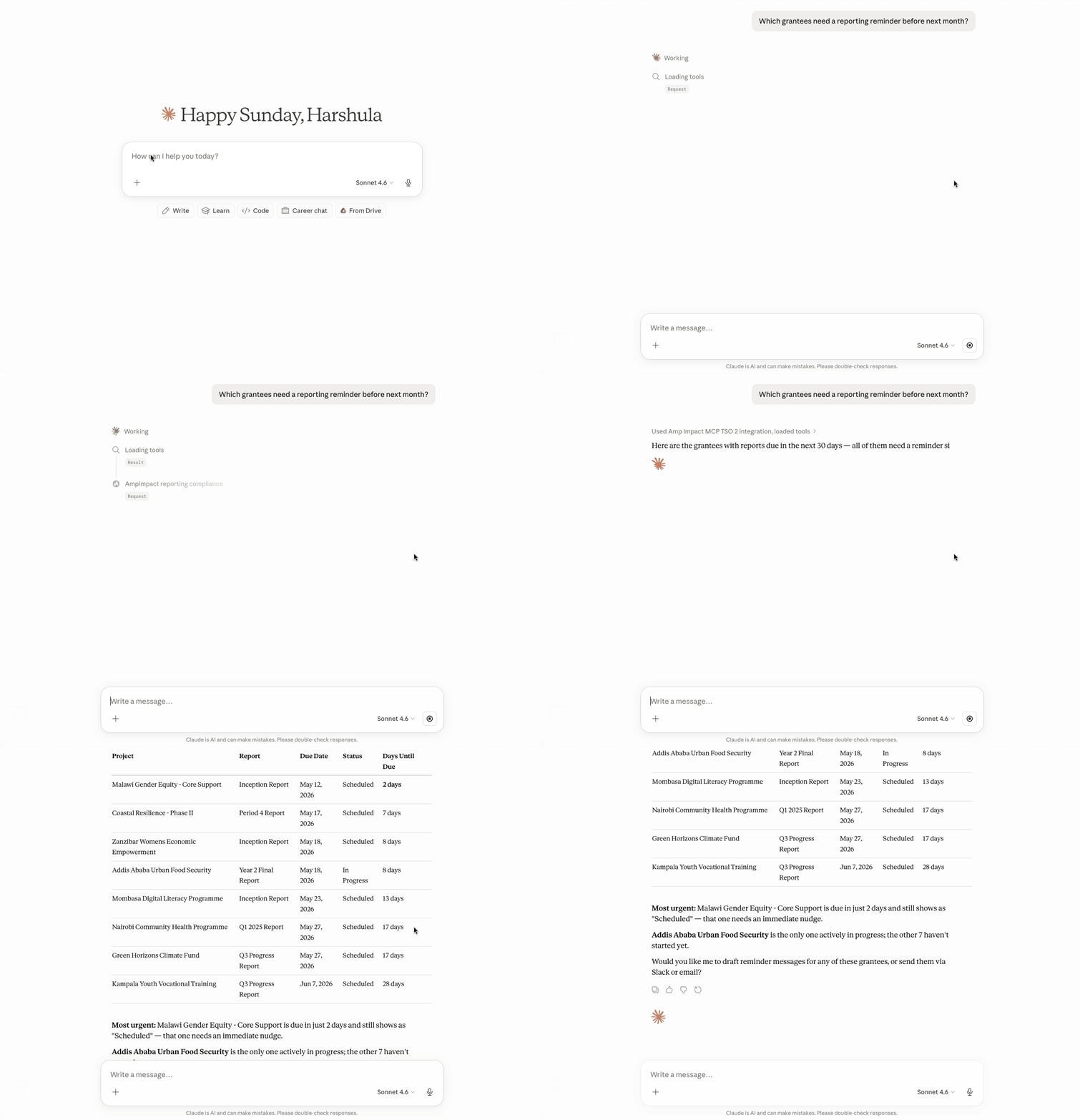
Five initial use cases
We started with five read-only tools, built around the questions we hear most often:
1. Project timeline: what's starting, what's ending soon, and what's recently closed?
2. Reporting compliance: who has submitted, who is overdue, and who tends to run late?
3. Budget utilization: which grants or projects are over- or underspending?
4. Disbursement summary: what's due and what's been paid?
5. Pipeline analysis: what's sitting at application or call for proposals stage?
We’ve also built general tools for asking additional Amp Impact-related questions, even simple things like "what does this object do?"
One practical note: the connector sits outside the Amp Impact package, so it's set up separately and needs to be hosted, either by a provider your organization already uses or by us. Your Customer Success Manager is happy to talk through your use cases and help you find the right setup.
Design and Considerations
Connecting AI to organizational data can raise questions. We address these in three ways:
1. Access: Users only view data they already have permission to see in Amp Impact.
2. Consistency: The connector applies Amp Impact’s existing definitions, such as which statuses count as “submitted.” As a result, users with different roles and levels of experience receive the same answer to the same question.
3. Efficiency: It uses fewer AI resources than open-ended prompting, which lowers both cost and energy use.
Vera's 9 Principles of Responsible AI for Nonprofits guide our design.
Everyday Improvements
Conditional logic on Submission forms
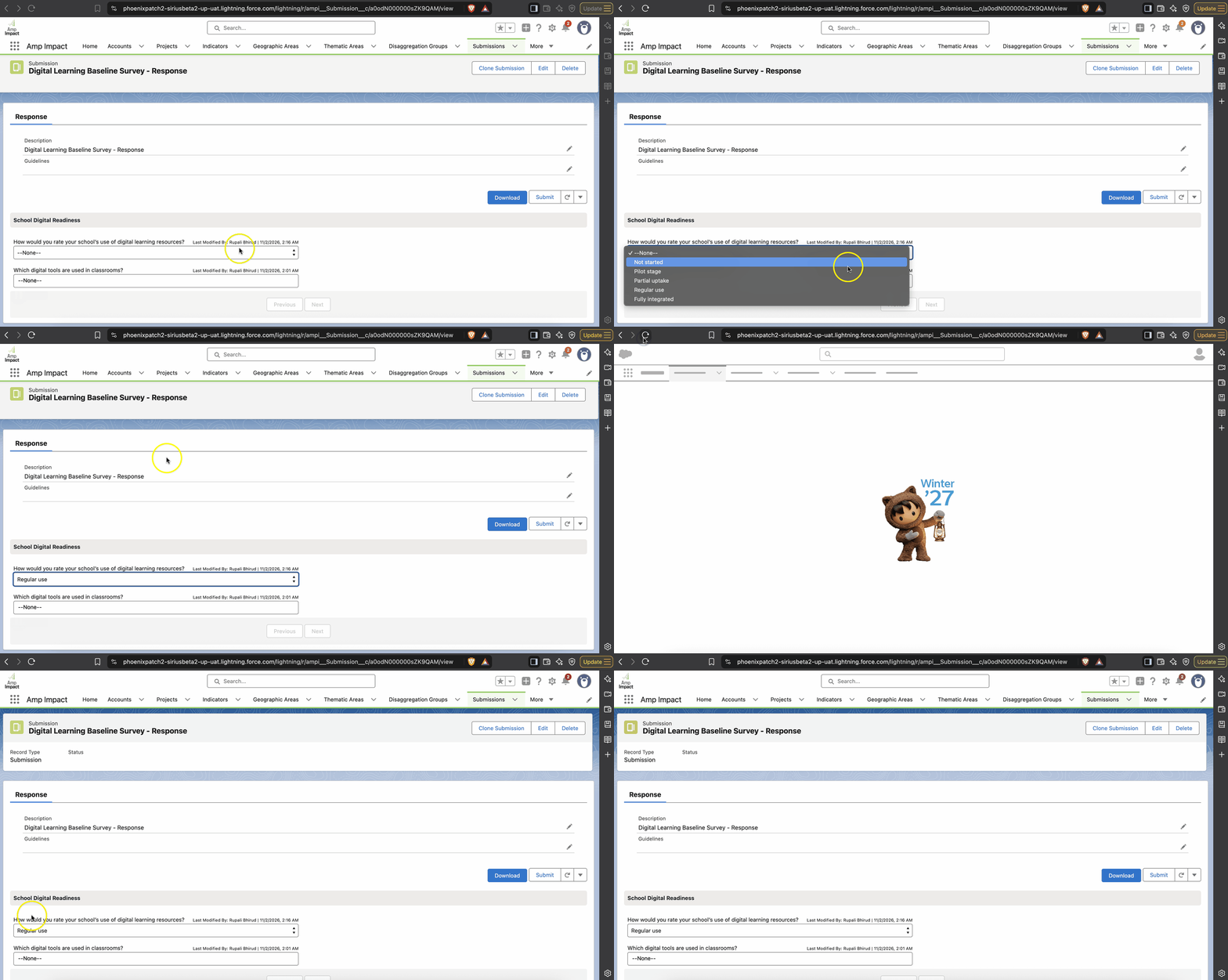
Picklist answers in Submission forms now save as soon as an option is selected. Any follow-up questions linked to that answer appear immediately. This behavior matches common form tools such as Google Forms and Microsoft Forms.
Submission forms are used for applications, calls for proposals, and other grant processes in Amp Impact. This change responds to feedback from the foundations and organizations that use them.
Clearer messages with missing access
When a user lacks the permissions needed for an action, Amp Impact now displays a message that names the specific field or object involved. This helps users understand the issue and allows administrators to identify and update the relevant permission directly.

Indicators, Targets, & Results
Faster STAR tables that handle higher data volumes
This release rebuilt both STAR (Set Targets and Add Results) tables in Amp Impact to handle larger volumes of data. Both now load faster even when indicators are disaggregated by four or six groups, such as sex, age, and district. The new LWCs are also available in Spanish and Portuguese.
-
Set Targets now manages up to 32,000 records (up from 7,000), and Add Results up to 15,000 (up from 2,200).
-
Indicators now show page by page, and you can choose to see 10 to 25 per page.
-
Data entry pop-ups can hold up to 3,500 records (up from 500), loading more as you scroll, rather than all at once.
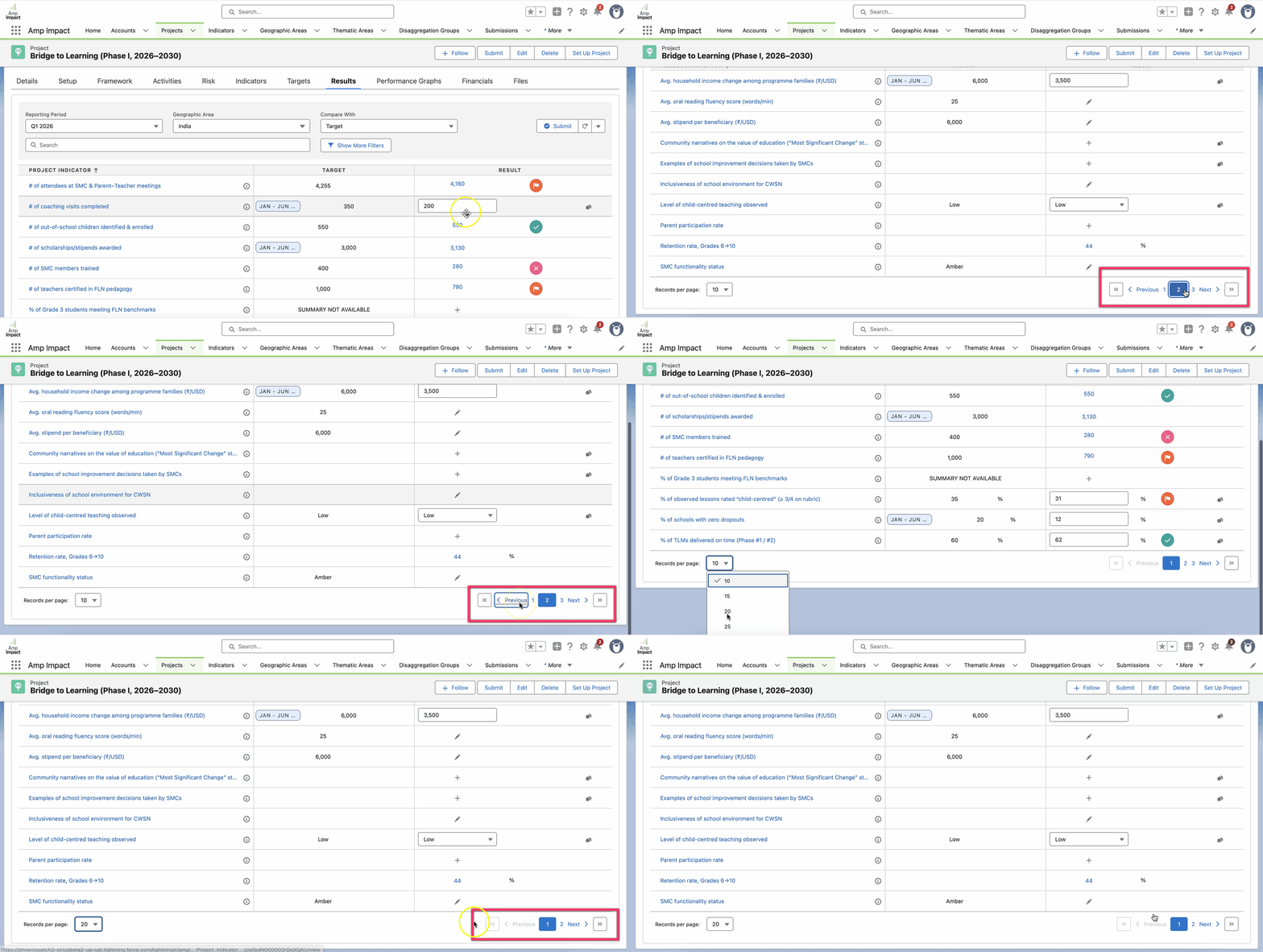
Organization that helped shape this:
Plan International, which has used Amp Impact for MEAL since 2019 and is among the most active voices in our Amp Impact Peer Learning and User Advisory Groups. Plan's feedback shaped these changes, and the team beta-tested the release with us. As one of the team put it: "Nice to be able to change how many indicators were being viewed." Thank you, Plan!
Larger Target & Result data upload and download templates
You can download targets and results as an Excel template, share it with partners or field teams to complete, and upload it back into Amp Impact. The templates now match the new limits: 32,000 records for Targets and Baselines, and 15,000 for Results, for both offline and online workflows. A progress bar now indicates the status of a large upload or download. You can upload the same template as many times as needed, with only new or updated values coming through each time.
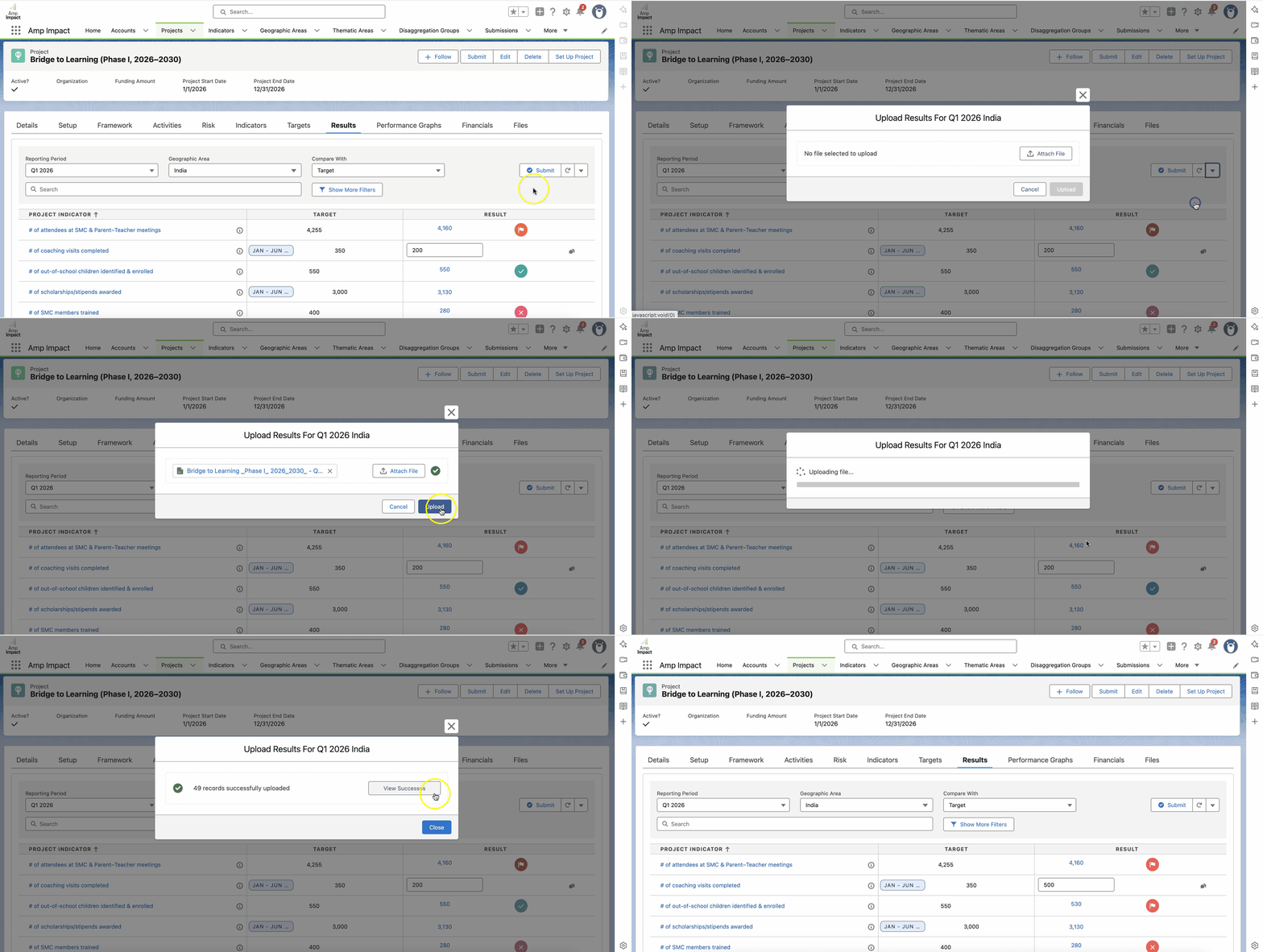
Content Versions for very large template downloads are now split into smaller content version files of about 3,000 rows each.
A few finishing touches
We also took the chance to polish some smaller details on the STAR pages:
-
Picklist dropdowns now open above the table for improved visibility.
-
The Targets template Comments column is blue, providing a clear indication it’s editable.
-
The Reporting Period pill on the Add Results table now uses a more accessible color for better readability.
-
Applied simplified user experience on the Excel Download pop-ups, with just “Download” and “Cancel” buttons
FAQs
Getting Started
Already using Amp Impact? Your Customer Success Manager can help you work out the best upgrade path and timing for your team, whether that’s upgrading to Sirius now or planning it alongside a future release. You can run the upgrade in-house or with support from the Vera team, either as a standalone engagement or as part of existing work. When you’re ready, your CSM will share the Sirius upgrade links.
If you’re a few releases behind, there may be features and enhancements from earlier releases you haven’t explored yet. Your CSM can point out the ones most relevant to you, or share our summary of features across recent releases so you can review them yourself.
Curious about the Amp MCP Connector? Organizations have already shared ideas like spotting data gaps, sending leadership a weekly progress report, and drafting emails to grantees. Think about the questions your team asks most often, who would be asking them, and how you get those answers today. Then share them with your Customer Success Manager, or email us at success@verasolutions.org, and we'll set up a call.