

On 17 March, Vera Solutions hosted the first session in its Unlocking AI for Nonprofits webinar series. The question we kept returning to was not what AI can do, but what it should do, and for whom. That orientation is inseparable from why Vera is one of four inaugural Strategic Integration Partners for Claude for Nonprofits. Anthropic selected partners not just for technical capability, but for alignment in values and approach. Vera’s mission to amplify the impact of the social sector maps directly onto Anthropic’s commitment to ensuring the world safely navigates the transition through transformative AI. That shared orientation shapes how we work: we lead with outcomes. Before recommending any AI solution, we ask whether it is appropriate, whether it will move the needle, and whether the organization is ready to adopt it responsibly.
Summary:
- Vera Solutions hosted “Unlocking AI for Nonprofits: Introducing Claude for Nonprofits” on 17 March, the first session in an ongoing webinar series designed to help the social sector navigate AI.
- The session introduced Claude for Nonprofits, Anthropic’s discounted access program offering verified nonprofits Claude for Enterprise at up to 75% off, including MCP integrations, the Claude API, and training resources.
- Vera grounded the session in its 9 Principles of Responsible AI for Nonprofits, emphasizing that AI adoption should start with governance, ethics, and a clear demonstration of ROI before anything is built or deployed.
- Three live demos showcased key capability layers: document generation using Claude Skills, real-time Salesforce/Amp Impact data retrieval via MCP, and agentic multi-source data analysis using the Claude Agent SDK and MotherDuck.

What Is Claude for Nonprofits?
Claude for Nonprofits is a discounted access program from Anthropic that extends verified nonprofits Claude for Enterprise at up to 75% off list price—$96 per user per year for eligible organizations—alongside nonprofit-specific connectors, implementation partners, and learning resources. The program is currently available only to registered nonprofits.

The program includes:
- Claude App with Skills and Projects for writing, analysis, and knowledge management
- MCP Integrations that connect Claude to tools organizations already use, including SharePoint, Blackbaud, NetSuite, Asana, Google Workspace, Microsoft 365, Monday.com, and others, without requiring code
- Claude API for organizations embedding AI into donor portals, case management systems, or custom workflows
- AI Fluency for Nonprofits training, implementation blueprints, and access to implementation partners, including Vera

There are two key features of the Claude App:
A Claude Skill is a curated instruction file that tells Claude how to produce consistent, high-quality outputs for a specific task, such as generating funder reports to an organization’s own templates. Skills are stored server-side and applied automatically when relevant, meaning staff don’t need to re-explain requirements each time.
A Claude Project is a shared workspace where a team stores documents, context, and institutional knowledge so Claude always has the right background when assisting with work. Projects are particularly useful for teams that need Claude to stay current on strategy documents, brand guidelines, program frameworks, or organizational terminology. Claude Projects integrate with SharePoint and OneDrive via MCP, and Claude can build PowerPoint presentations using brand guidelines stored in a Project to ensure outputs stay on-brand.
Responsible AI as the Starting Point
Before walking through features or demos, we grounded the session in Vera’s 9 Principles of Responsible AI for Nonprofits. The principles span social and business value, ethics and community values, transparency, fairness and bias mitigation, privacy and data protection, environmental impact, robustness and security, accountability and governance, and human oversight and control.
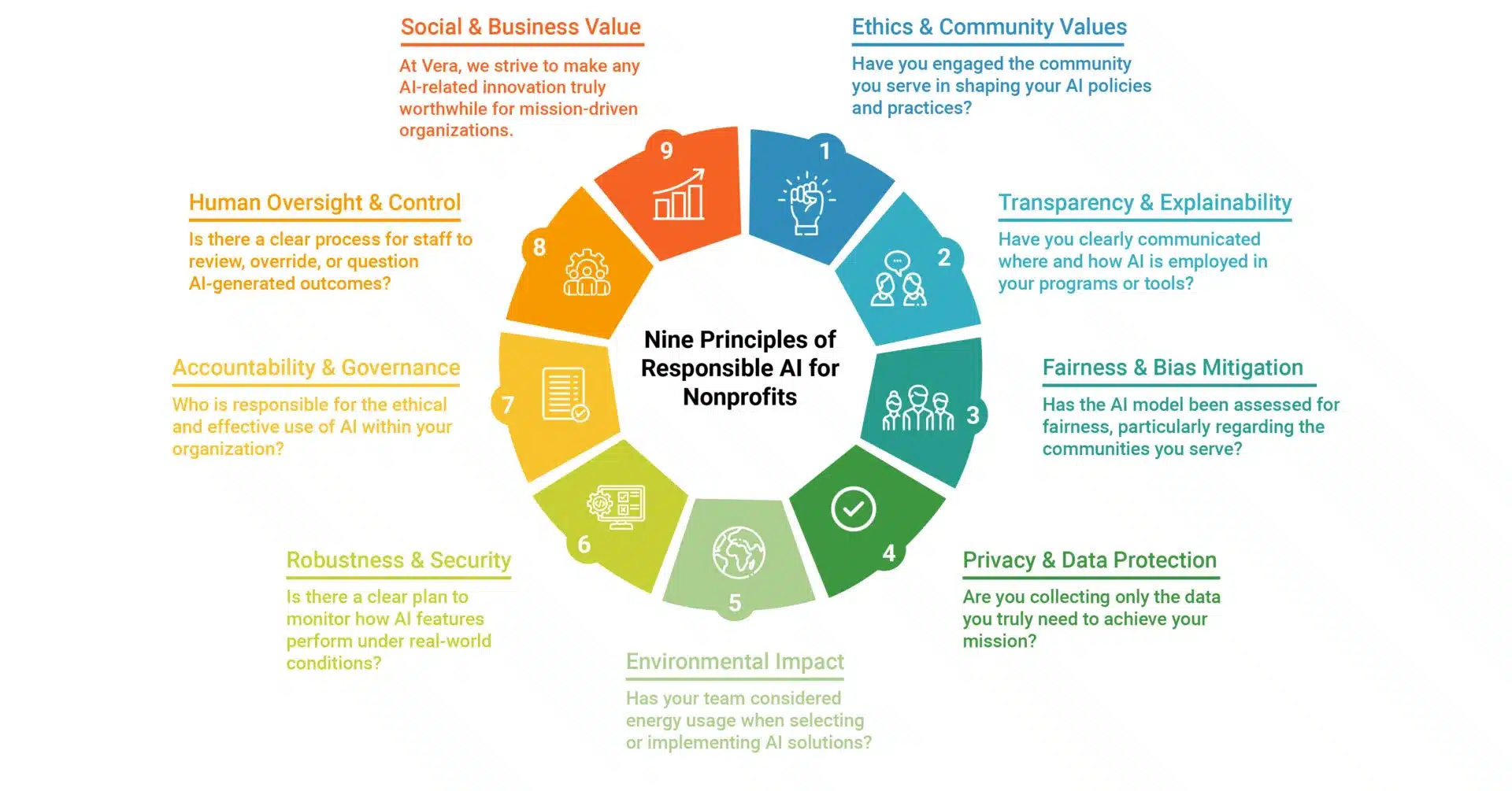
The framework is designed to help organizations determine whether AI should be applied in a given context, and under what conditions — before anything is built or adopted. These principles inform every AI engagement Vera undertakes and are available as a starting point for any organization developing its own AI governance posture.
On data privacy, Claude does not train on customer data without explicit opt-in. Both Claude Enterprise and Claude Teams restrict data from being shared or used in model training. More broadly, regarding data loss prevention, when connecting Claude to Salesforce or other systems, users authenticate with their existing credentials, and Claude respects their record-level access and permissions. Claude does not surface data that a user is not already authorized to see, and the same logic applies when connecting to other tools. Organizations that want to roll out MCP connectors incrementally can do so.
Regarding environmental impact, Anthropic is actively working to measure and reduce Claude’s carbon footprint, which is a legitimate consideration for ESG-conscious organizations.
Vera’s approach to any AI implementation begins with the same question we ask of every technology engagement: Does this save time, money, and headaches, and can we demonstrate that it does so responsibly? We will not implement a use case that lacks a clear ROI, introduces unacceptable risk, or bypasses the human judgment that mission-critical work requires. In practice, this means scoping narrowly before scaling, building human review into any consequential workflow, and treating governance as a design requirement. The 9 Principles are the lens we apply at the start of every engagement as a decision-making framework for what to build, what to defer, and what to decline.
How Claude Connects to Your Tools: MCP
A significant portion of the session covered the Model Context Protocol (MCP) — the open standard that lets Claude connect directly to external tools and data sources inside the chat interface, without switching between systems. MCP is what enables Claude to query Salesforce records, pull a SharePoint document, read from a Microsoft Dynamics finance system, or update a task in Asana, all from a single conversation window.
Notable MCPs for nonprofits include Google Workspace, Microsoft 365, Monday.com, Blackbaud, NetSuite, SharePoint and OneDrive. Claude is not natively integrated into Salesforce—it is an add-on integration—but Salesforce is developing a native MCP connector (not yet publicly released). In the meantime, organizations can connect via the API or use Claude as the model within Agentforce. Vera can support building a custom Salesforce MCP connector.
Claude can also act as a natural-language middleware layer, connecting to systems like Business Central and Amp Impact simultaneously to produce consolidated portfolio dashboards and reports, even when those systems are not directly integrated with one another. This provides meaningful consolidated intelligence without full system integration.
Three Demonstrations
The session included three live demos of use cases we’ve heard from 16 years of serving the sector, each illustrating a different capability layer.
Document Generation with Claude Skills. The first demo showed how a program officer can use a Claude Skill tuned to a funder’s reporting requirements to generate a structured draft from program data, significantly reducing the time required to produce high-quality narrative reports at scale.
Real-Time Data Retrieval via MCP with Salesforce Amp Impact. The second demo connected Claude to Salesforce and Amp Impact—Vera’s Salesforce-native impact measurement product, which manages over $12.5 billion in funding across 150+ countries—via MCP. Users can ask natural language questions directly against live Salesforce data without exporting files or writing queries. Several attendees asked about this capability for organizations on Salesforce Nonprofit Cloud who are not Amp Impact customers. Salesforce is developing a native MCP for Claude, and there are existing pathways to connect Claude to standard Salesforce orgs. We are happy to walk through those options directly and support in a custom MCP build, where necessary.
Agentic Data Analysis with Claude Agent SDK and MotherDuck. The third demo showed Claude operating as an agent, connecting to multiple data sources, running analysis, and returning structured visual outputs. This use case is directly relevant for organizations exploring scenario modeling, trend analysis, and forward-looking program decision-making.
Key Questions from the Session
Can Claude be embedded in a grantee portal for Amp Impact Submission quality checks (grant applications or grant reports)? Yes. We have prototyped inside Salesforce. Because Amp Impact runs on Salesforce Experience Cloud, a custom Lightning Web Component, within Amp Impact and Salesforce Experience Cloud, can be placed directly on a grantee portal and connected to the Claude API. A grantee completing a narrative or results submission would have an AI assistant on the page checking for completeness, flagging gaps against reporting criteria, and making suggestions before they hit submit. There are two practical approaches: an interactive assistant providing real-time feedback as the grantee writes, or a submission scan triggered once a draft is complete. The Skills layer is what makes this useful — quality standards, indicator definitions, and program requirements are encoded into the Skill, so feedback is specific rather than generic.
Does Claude connect to financial ERPs? Yes. Connectors exist for QuickBooks, Xero, and Microsoft Dynamics, and Vera is actively developing a NetSuite connector. For SAP or more specialized systems, the likely path is a custom connector. Two considerations apply before building one: first, security — financial data integrations should be scoped to read-only access where possible, with clear data handling policies and careful attention to what passes through the API, particularly for organizations working with restricted funds or under audit requirements. Second, cost — Claude API usage is metered, and workflows that repeatedly query large financial datasets can accumulate costs quickly without thoughtful query scoping and caching. When done well, the use cases are compelling: automated financial summaries for program reports, budget-versus-actual analysis across grants, and anomaly flagging before issues become audit findings.
How does Claude compare to Gemini or Copilot? They serve different strengths and can be run in parallel. Claude is strongest for structured, high-fidelity agentic work — running workflows, building Skills, drafting complex documents where consistency and precision matter. Gemini’s larger context window makes it better suited for summarizing long reports, analyzing large datasets, or processing video content, and it integrates naturally across Google Workspace for everyday tasks. Google’s NotebookLM is also worth noting for making sense of large document collections and research synthesis. Copilot integrates with Microsoft 365 — and Claude is now available in Copilot through a recent partnership between Anthropic and Microsoft, creating a path for M365-restricted organizations to access Claude through their existing procurement structure. Many organizations, including Vera, run more than one without conflict.
Claude vs. Agentforce — which should we use? The two are complementary rather than competing. Claude is the underlying model powering Agentforce and performs well for Salesforce-native automation. Claude adds broader value when synthesizing across systems, handling unstructured data, or spanning multi-tool workflows. A full comparison post is forthcoming.
How do you prevent AI from giving conflicting or unreliable guidance? One attendee raised a scenario where two parties in a negotiation used separate AI tools and received opposing recommendations, each backed by data, causing the deal to stall. This is a risk wherever AI is applied to analysis without a shared data foundation or governance framework. The practical mitigation involves three layers. First, engineering: only a small slice of an agentic workflow should be probabilistic – tool selection. Everything else, including the API calls, parameters, and validation rules, should be deterministic and auditable. Second, rules-based guardrails: for any action-taking tool, a pre-execution check should evaluate whether the action is permissible before the model takes any action. The model decides what to attempt; a rules engine decides whether it is safe to proceed. Third, human judgment: staff interacting with AI outputs should apply what we call the 4Ds:
- Delegation (did I assign the right task to the right tool?),
- Description (was my request precise enough?),
- Discernment (does this result make sense given what I already know?),
- Diligence (for anything consequential, cross-reference before acting)
This last layer is the one most AI rollouts skip, and it is where governance frameworks like Vera’s 9 Principles become operationally relevant.
Does Claude work in languages other than English? Yes. Claude performs well across dozens of languages, including Spanish and others relevant to global NGO operations.
Is Claude available in all regions? The Claude.ai interface has some regional restrictions. The Claude API is more broadly accessible and can be embedded into existing staff or program portals as a workaround, with the Claude infrastructure invisible to end users. Here is full list of countries for which Claude is accessible.
Getting Started
Organizations at any stage of AI adoption can take the following steps:
- Sign up at Claude.ai and begin experimenting with the base product
- Complete the AI Fluency for Nonprofits course for structured onboarding
- Conduct an AI Readiness Assessment with Vera to identify the highest-value entry points
- Join a Vera AI Peer Learning Group to learn alongside peer organization
- Schedule an AI Strategy Consultation for organizations ready to move into implementation
You can verify your nonprofit status here for the Claude for Nonprofits discount or contact Anthropic for pricing.
The recording and slides from this session are available. The next session in the series will cover advanced use cases, including Claude Cowork, Claude Code, and agentic workflows.
FAQs
What is Claude for Nonprofits?
A discounted access program from Anthropic extending verified nonprofits Claude for Enterprise at up to 75% off the list price, alongside nonprofit-specific connectors, implementation partners, and learning resources.
What is a Claude Skill?
A curated instruction file that tells Claude how to produce consistent, high-quality outputs for a specific task, such as generating funder reports to organization templates.
What is a Claude Project?
A shared workspace where a team stores documents, context, and institutional knowledge so Claude always has the right background when assisting with work.
What is MCP?
Model Context Protocol (MCP) is an open standard that lets Claude connect directly to external tools and data sources inside the chat interface, without switching between systems. Notable MCPs for nonprofits include Google Workspace, Microsoft 365, Monday.com, and more.
Does Claude train on my organization's data?
No. Claude does not train on customer data without explicit opt-in. Both Claude Enterprise and Claude Teams restrict your data from being shared or used in model training.
How does Claude compare to Gemini or Copilot?
They serve different strengths. Claude is strongest for structured, high-fidelity agentic work. Gemini integrates natively into Google Workspace. Copilot integrates with Microsoft 365, and Claude is now available within Copilot through a recent partnership between Anthropic and Microsoft. Many organizations run more than one.
Is Claude integrated into Salesforce?
Not natively. It is an add-on integration. Salesforce is developing a native MCP for Claude. In the meantime, organizations can connect via the API or use Claude as the model within Agentforce.
Is Claude for Nonprofits available to social enterprises?
Not at this stage. The program is currently for registered nonprofits only.


