

Quasar (v1.47) advances program and partner management by introducing offline Excel form capabilities, real-time collaboration tools, and automated indicator result reporting hierarchies.
The Quasar release (v1.47) marks a significant milestone in Amp Impact’s journey. As our 24th major release, it continues our commitment to supporting organizations managing complex programs, partnerships, and reporting requirements across diverse contexts.
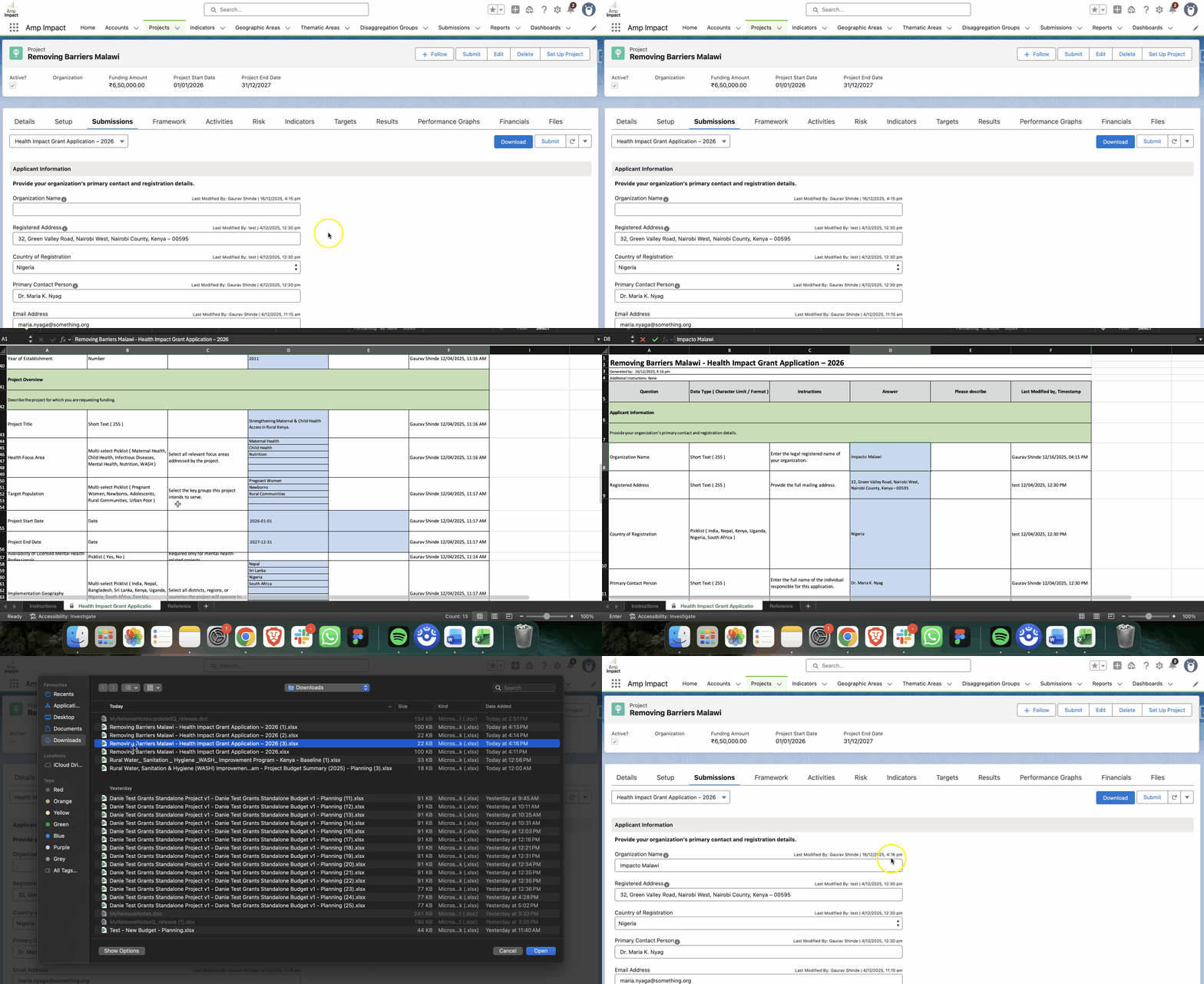
Greater Flexibility for Submissions: Excel Download & Upload
Quasar now allows you to download Submission Response Forms as Excel files, complete them offline, and upload them back into the system. This enhancement expands the ways teams and partners can engage with Forms, supporting:
- Offline Data Collection: Specifically important for field teams working in areas with limited internet connectivity, who cannot afford to lose progress.
- Partner & Grantee Collaboration: Crucial for external partners who prefer working in Excel, allowing them to use familiar tools while ensuring data is easily synced back to the system.
- Efficient Review: Designed for Program Managers and grant application reviewers who need to vet large amounts of data offline in a single spreadsheet instead of clicking through multiple screens.
- Simplified Migration: Essential for System Admins who need to move large volumes of historical or legacy data into the system by mapping it to the template instead of using manual entry.
Enhanced Collaboration on Submission Response Forms
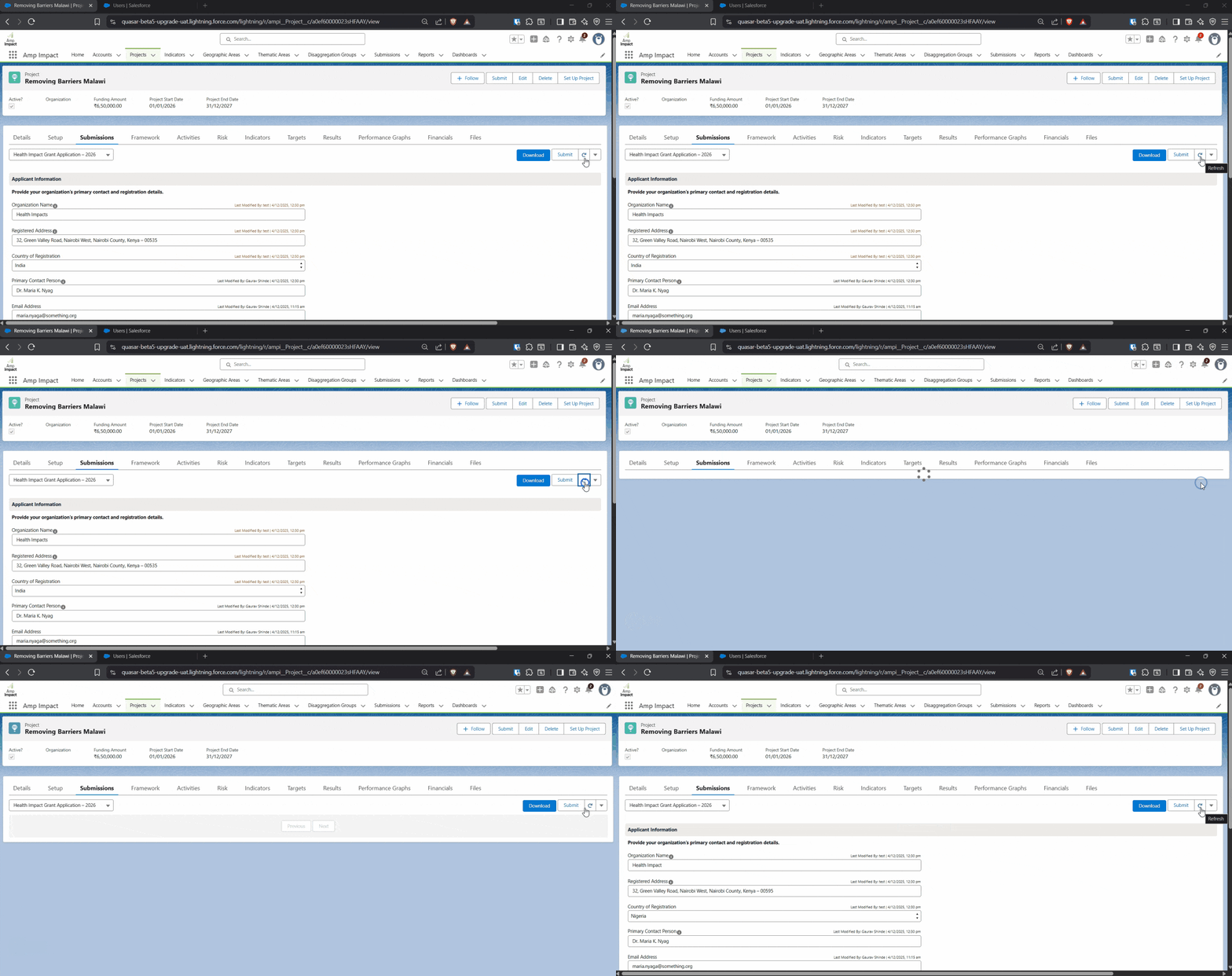
To support shared workflows, Quasar introduces new real-time collaboration features within the Submission Response Form:
- Real-time edit indicators: Users can see exactly who is updating a Submission and when the change was made, preventing accidental overwrites.

- Manual refresh: A new button lets users instantly reload the form to view the latest updates from their team.
Streamlined Reporting Period Setup
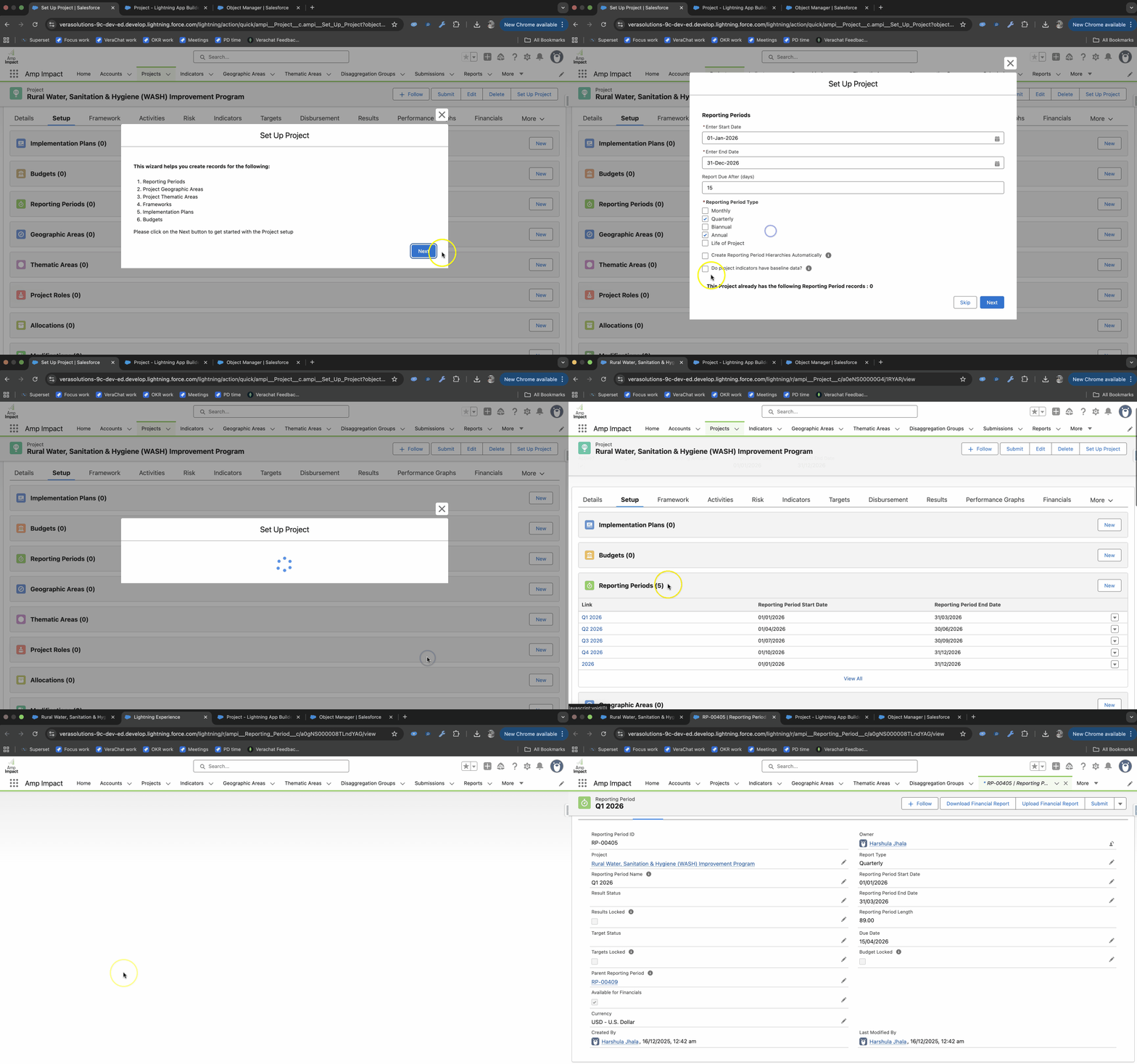
Quasar enhances the Project Setup Wizard by allowing users to automatically create Reporting Period hierarchies, such as Annual → Biannual → Quarterly → Monthly.
When enabled, Amp Impact establishes parent–child relationships based on dates and maintains consistency as Reporting Periods evolve. This supports clearer aggregation, reporting, and analysis across program timelines.
Clearer Performance Tracking Across Reporting Frequencies
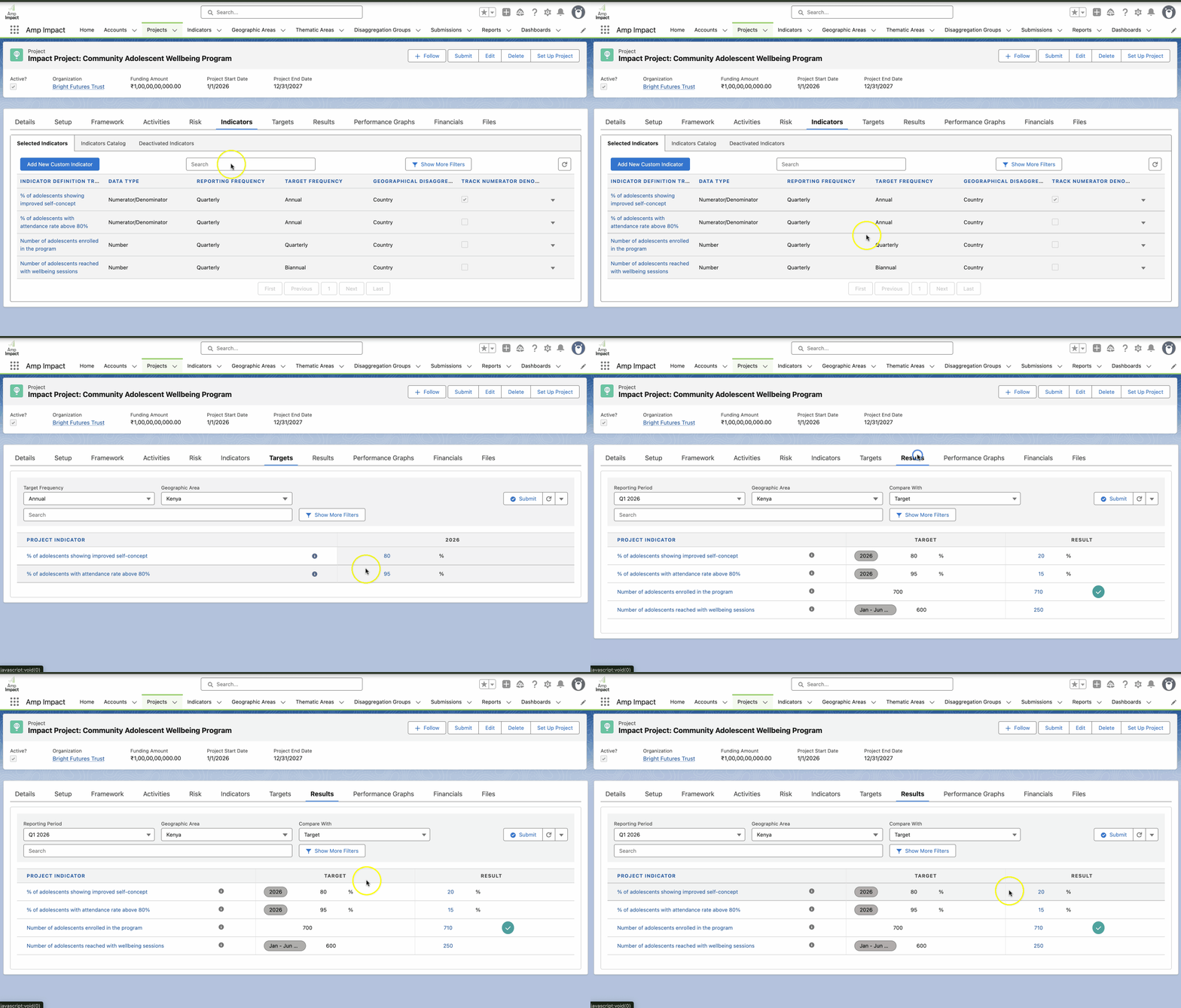
With Quasar, Amp Impact supports comparing Targets and Results set at different reporting frequencies when Reporting Period hierarchies are in place. Once hierarchies (for example, Annual → Biannual → Quarterly → Monthly) are set up, teams can:
- Enter high-frequency Results (e.g. Quarterly or Monthly).
- View and compare them against lower-frequency Targets (e.g. Annual or Biannual).
- Clearly see which Reporting Period a Target is derived from via visual labels.
By building on well-defined Reporting Period hierarchies, this capability enables more meaningful progress tracking while supporting a wide range of planning and reporting approaches.
More Complete Baseline Data for Numerator/Denominator Indicators
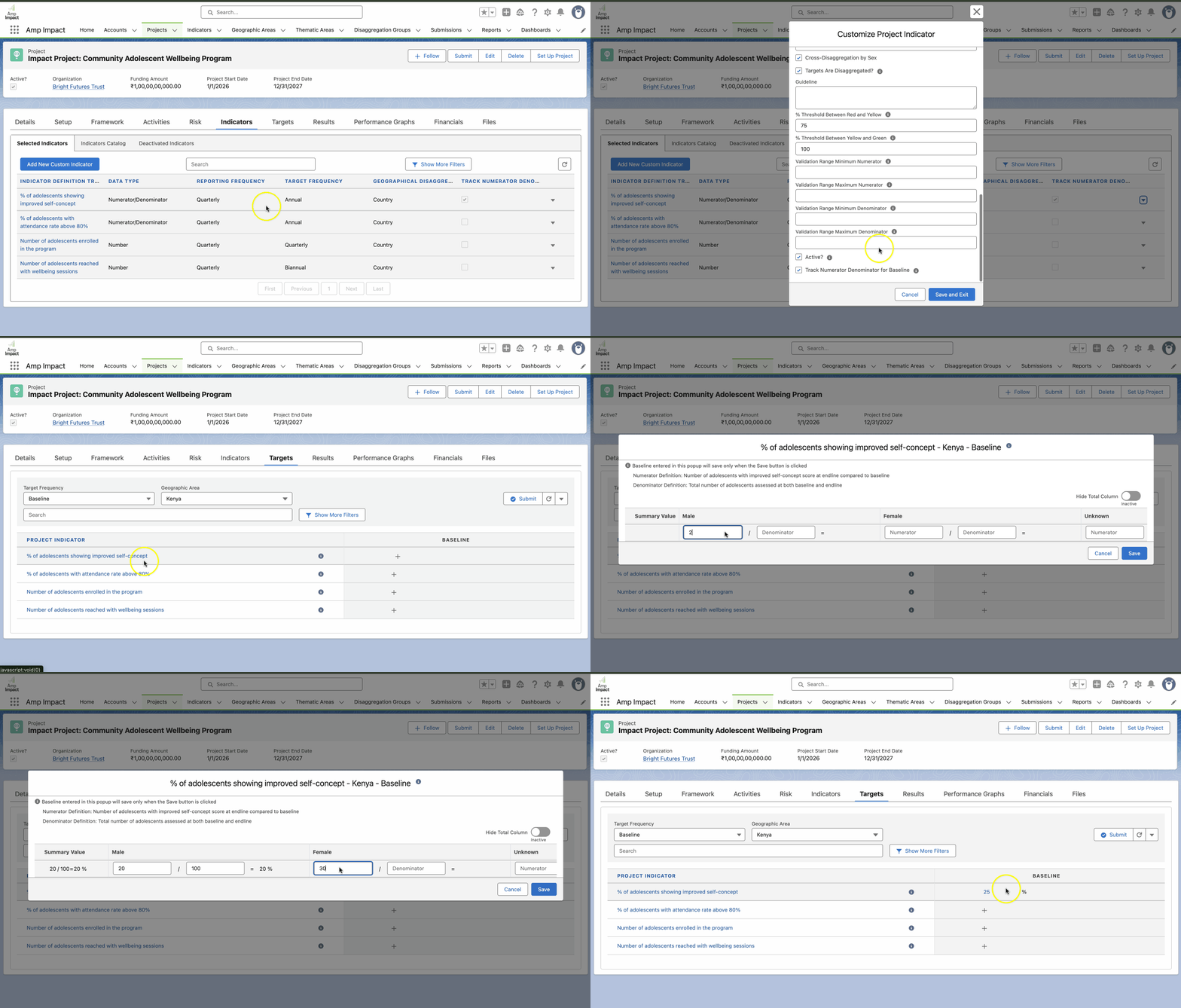
Quasar extends baseline tracking for Numerator/Denominator indicators by allowing users to:
- Capture Numerator and Denominator values directly for more granular tracking.
- Automatically calculate resultant percentages to reduce manual errors.
- Select the most appropriate baseline tracking approach for each indicator.
- Enter and validate baseline numerator/denominator data via Excel templates.
- Compare baseline and results breakdowns side by side for clearer interpretation.
These enhancements strengthen the data foundation for program monitoring and evaluation.
Continued Improvements in Financial Management
The Quasar release includes enhancements that support clearer, more efficient financial planning and reporting, particularly for teams working with Excel-based workflows:
- Auto-calculation of budget values during Excel uploads ensures consistency with in-system formulas.
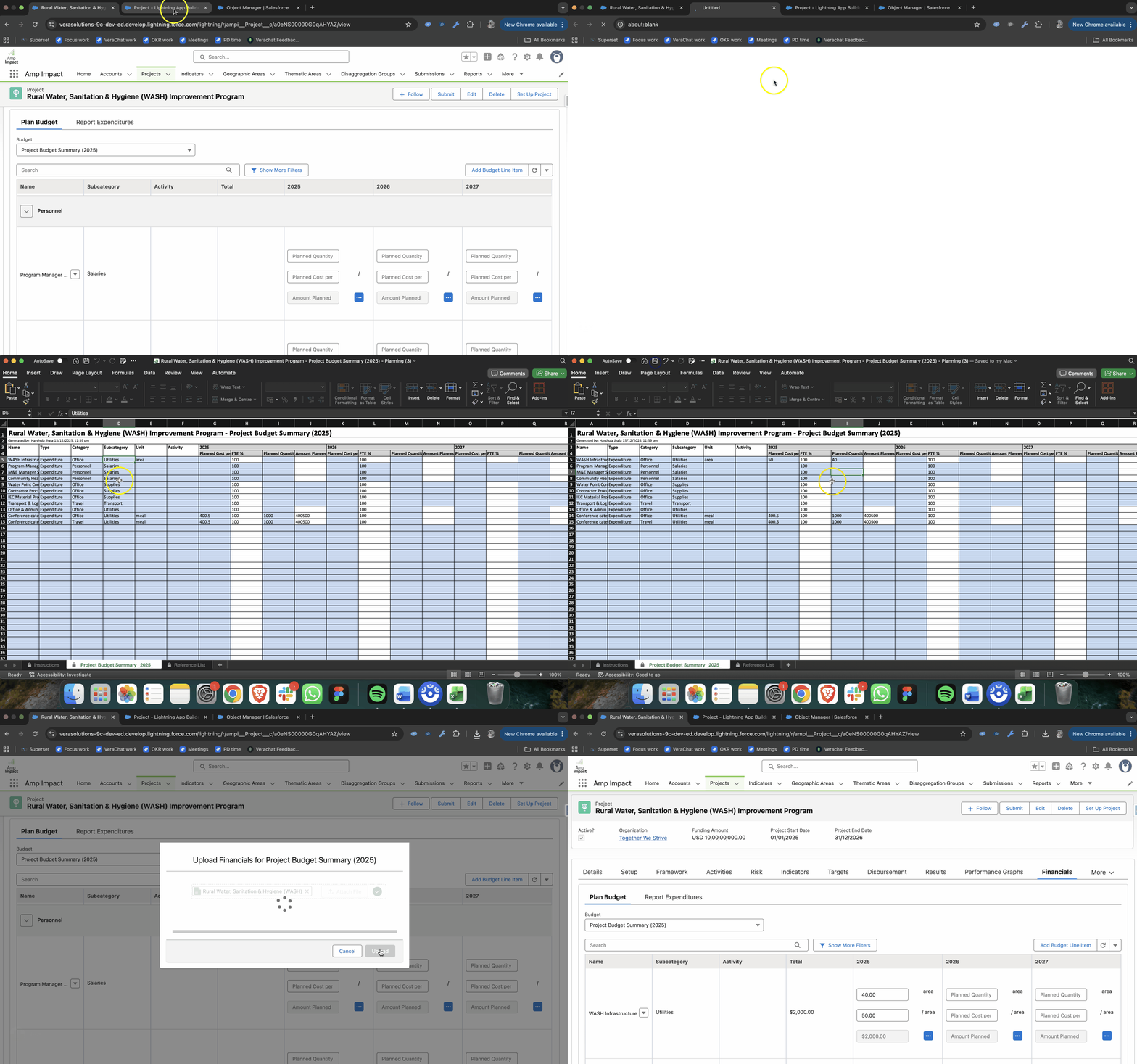
- Real-time visual cues for editable fields in financial templates help users understand exactly which values can be updated based on their selections.
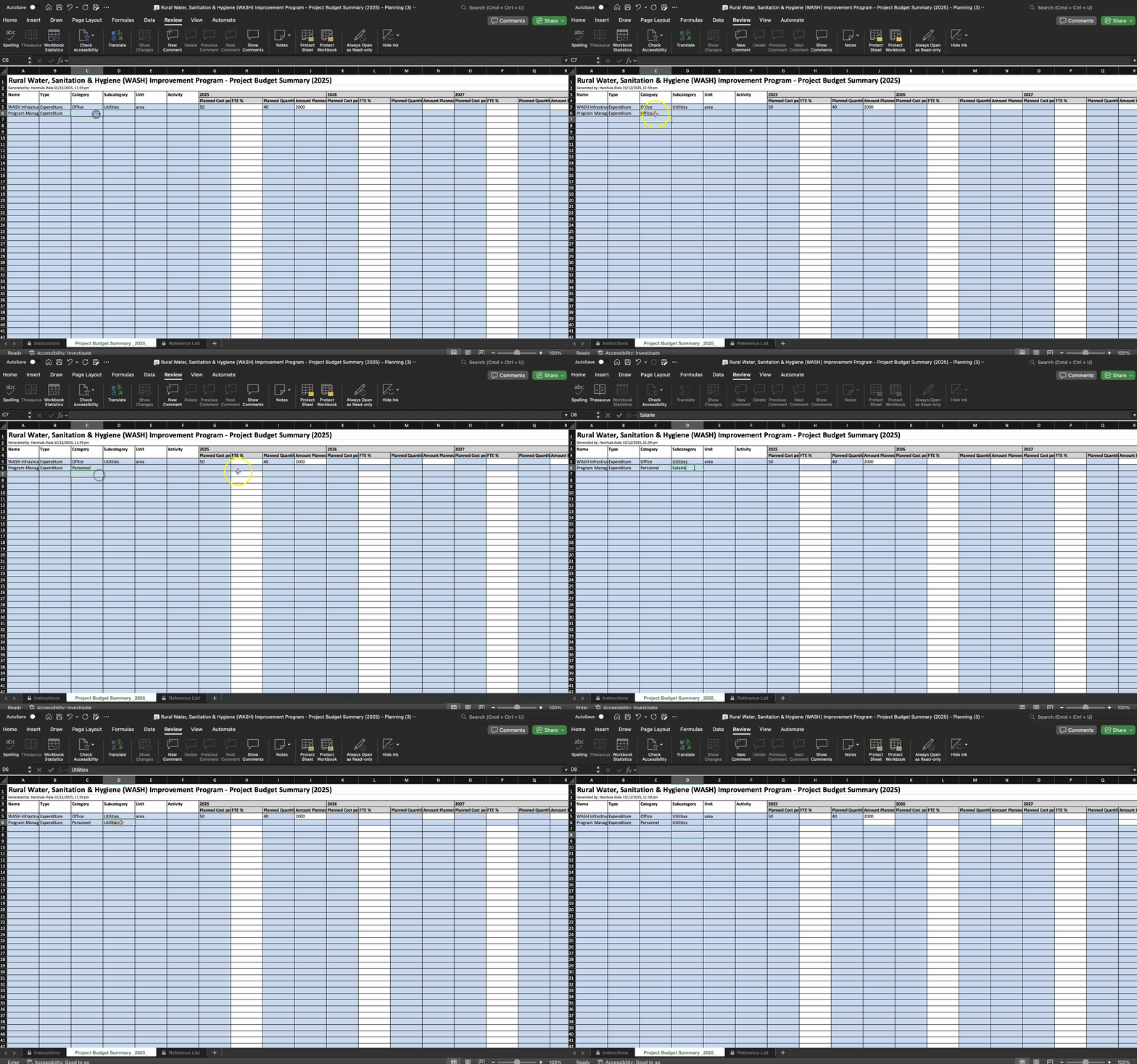
Together, these enhancements reduce manual effort and support more reliable financial data management across planning and reporting cycles.
Continued Improvements in Workplanning
Quasar introduces enhancements to support more effective planning and progress tracking within implementation plans:
- Planned Due Dates can now be set for Milestone activities.
- Visual Comparisons: Planned Due Dates are visible on the Activity Gantt Chart, enabling a clear comparison between planned and actual timelines.
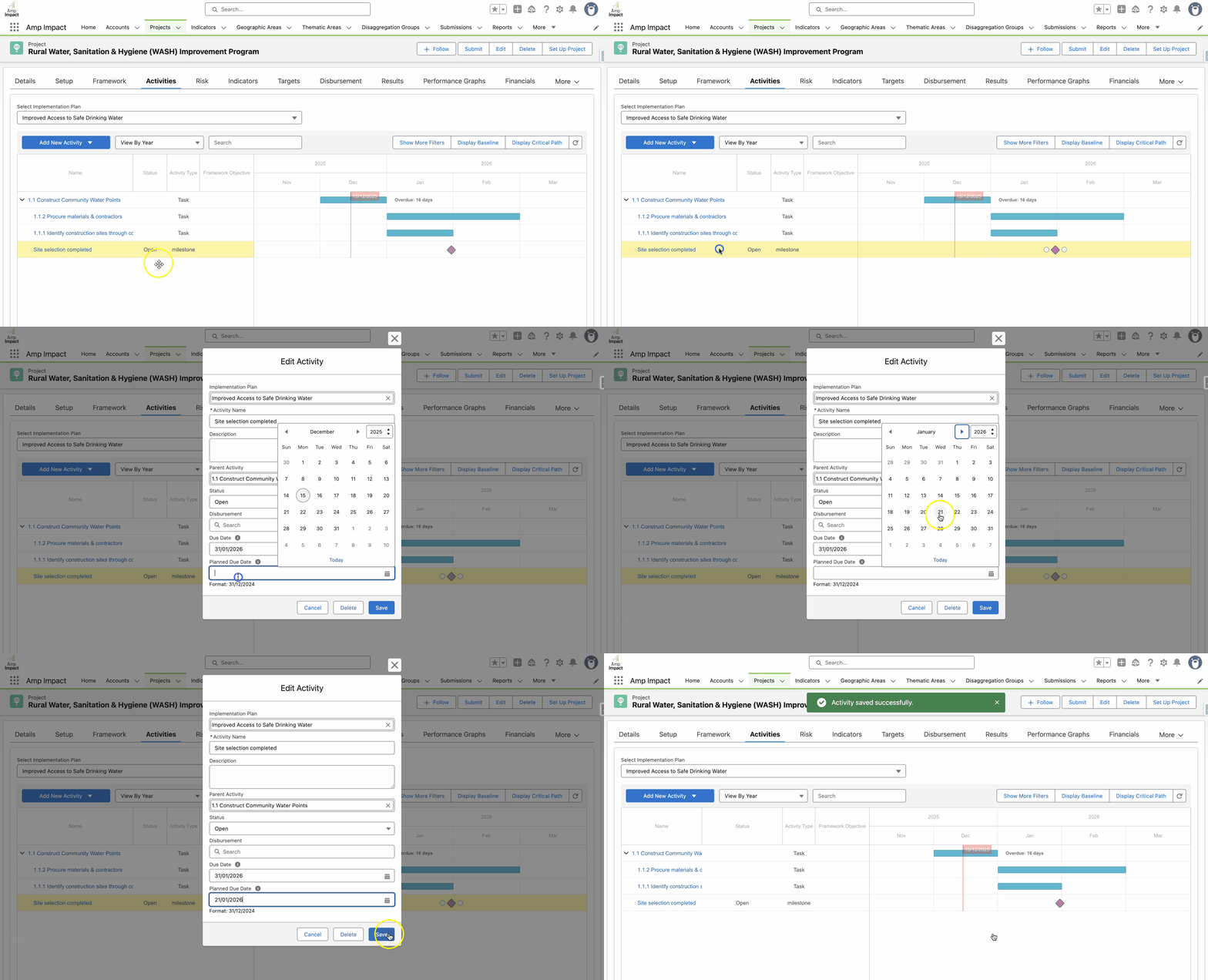
These updates support more accurate baseline planning and help teams track progress with greater clarity.
Ready to Upgrade?
Quasar is available as part of the regular Amp Impact upgrade cycle. Upgrading allows organizations to benefit from the latest features, performance improvements, and security refinements.
Detailed release notes, upgrade instructions, and setup guidance are available here in the Amp Impact Knowledge Base.
For questions about the upgrade process or to discuss how these new features align with current goals, please reach out to your Customer Success Manager or contact the team at success@verasolutions.org.
Looking Ahead: What’s Coming in Raven
We’re already working on the next Amp Impact release, Raven, planned for May. If you’re interested in learning more about what’s coming next or how upcoming enhancements may align with your priorities, your Customer Success Manager would be happy to share more and explore what’s most relevant for your team.
Continuing to Build with Our Clients
Quasar reflects Vera Solutions’ ongoing collaboration with the Amp Impact community. Each enhancement is designed to support the diverse ways organizations plan, deliver, and measure impact—while maintaining consistency, usability, and trust in the data.
Can I use the Excel upload feature for historical data migration?
Yes. Organizations can quickly migrate large volumes of legacy data into the system by mapping it to the Quasar Excel template rather than entering it manually.
How do real-time edit indicators improve team coordination?
These visual cues show exactly who is editing a Submission Form and when a change is made, helping parallel teams stay aligned and preventing data overwrites.
Does the system support comparing monthly results against annual targets?
Yes. Once reporting hierarchies are set up, Quasar allows teams to view high-frequency Results against lower-frequency Targets and identify the exact period each target is derived from.
How is the Amp Impact roadmap prioritized?
Vera prioritizes the Amp Impact roadmap by focusing on the features that provide the greatest value to the most users, while ensuring high-impact fixes are integrated as early as possible to maximize platform reliability.
What is the Amp Impact Community of Practice?
The Amp Impact Community of Practice connects system owners, superusers, admins, and project sponsors to share practical insights and inform ongoing improvements to Amp Impact and related services.
About the Author
Carmen Kingwill is a Customer Success Manager at Vera Solutions. With a deep background in sustainability and a passion for excellence in client service, Carmen serves as a bridge between the social sector and Vera’s technical teams. Recently recognized with Vera’s Sustainability Award, she is dedicated to ensuring that organizations have the tools and support they need to drive long-term, measurable impact.
